Copy workflow
Overview
The Copy Workflow feature allows users to duplicate an existing automation flow from one Business App to another within the same Workspace. This significantly reduces setup time when migrating successful automations or creating template-based workflows in different environments.
The feature is intelligent enough to handle complex dependencies, including recursively copying sub-workflows (child flows) referenced by the main parent flow.
How to Use
- Select the Flow: In your current Business App, locate the workflow you wish to duplicate.
- Initiate Copy: Select the Copy option from the workflow actions menu.
- Choose Destination: Select the target Business App within the current Workspace where the flow should be copied.
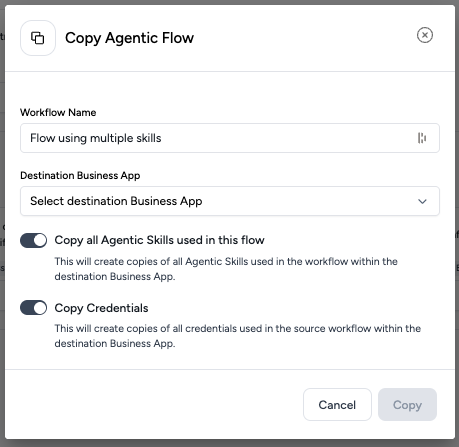
- Configure Copy Options: You will be prompted to choose how to handle data dependencies:
- Copy all Agentic Skills used in this flow: Toggling this one will clone all the referenced skills.
- Copy Credentials: Toggling this on will clone the necessary credentials alongside the flow (e.g., for Outlook nodes).
Copy all Agentic Skills used in this flow
This setting determines whether the logic and intelligence of the flow are migrated or just the selected nodes.
Enabled (Default):
- Full Asset Migration: The system creates copies of all Skills referenced in the flow, preserving all existing versions of those skills.
- Sub-Workflows: Any child workflows referenced by the parent are automatically detected and copied with their skills intact.
- Outcome: The flow is immediately functional in the destination App.
Disabled:
- Structure-Only Copy: The system migrates the selected nodes and connection lines to preserve the flow's architecture.
- Empty Nodes: Skill nodes are created but remain unconfigured (empty).
- Outcome: You must manually configure each skill node in the destination App by creating new skills or linking to existing ones.
The node is copied to maintain the workflow's layout, but the associated Agent skill is not migrated. To restore functionality, you must create the Agent skill in the destination app and then configure the node to reference it.
Copy Credentials
- Enabled: Credentials required for specific nodes (e.g., Outlook, Sharepoint) are cloned to the destination.
- Disabled: The nodes are copied, but authentication details are stripped. You will need to re-authenticate or select valid credentials in the destination App.
Review Status
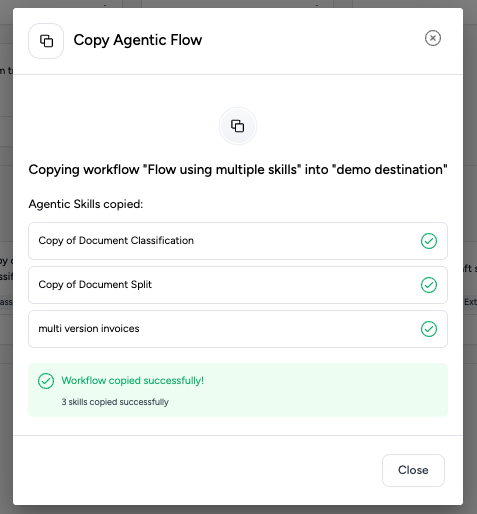
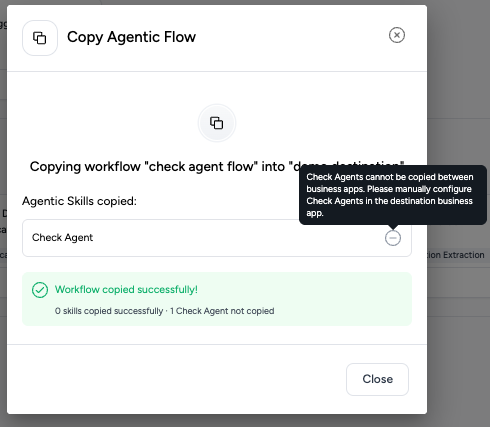
Upon completion, a status report will display the success of the operation for the flow and individual skills.